Google shared a new guide on how to write effective prompts for artificial intelligence-generated images. The resource provides guidance on the types of details to provide, and said that following these guidelines can create more reflective, responsive outputs from the company’s Gemini systems.
Google recently launched its new Gemini Omni image and video generation model, which is its most advanced visual creation tool. The model is able to provide realistic-looking outputs based on text queries.
This new guidance aims to help users refine and improve prompts to the Omni system, while the specifications are also likely to help improve image and video outputs in other AI models.
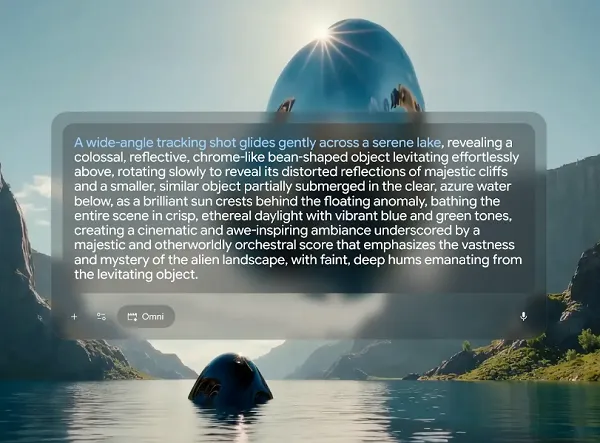
Google provided a range of guide notes on how to create the best AI visual prompts, including:
- Shot framing and motion – Including specific notes on the shot, such as wide-angle or close-up, can help to guide the specific visual output required. In terms of video, users should advise the system on how the visual should move, with specific guidance on the type of shot to create.
- Style – Specifying visual style, such as realistic or cinematic, will also help improve visual outputs. AI systems are able to understand conversational language, and users should consider the specifics of the style they want to better align their outputs. Cartoonish? Futuristic? The more specific the language, the better.
- Lighting – Google advises users to specify lighting cues, including where the light is coming from and what types of light sources are in the scene (e.g. the sun, a streetlamp). Prompts should also outline how the scene should feel.
- Location – Specifying the landscape, and what’s in the scene, will provide additional guidance to help bring imagined visuals to life, and better reflect the concept. What types of trees and rocks are in view, what type of terrain? These details will further refine and improve the final output.
- Action – Finally, Google advises users to specify what’s happening in the scene. “Who are the characters and objects?” Google asked. “How are they moving and interacting?” These notes will ensure that the outputs are reflective of the imagined idea.
Google Omni includes a range of expanded editing functions and tools that can help users create more advanced visuals. But these tips provide some generic guidance that can also help to guide other AI tools to provide more responsive, reflective outputs.