LinkedIn is trying out a new navigation experience, with streamlined function listings designed to simplify in-app navigation on both desktop and mobile versions.
On desktop, LinkedIn has consolidated its function menus into fewer listings. The “Profile” tab now links to analytics, saved posts and settings, and a new “More” tab provides access to LinkedIn’s puzzle games, news, groups, events, newsletters and video.
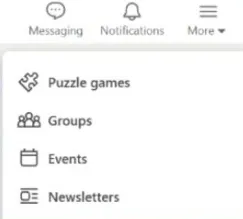
In the mobile version, users will see the same menu updates in the lower function bar, with consolidated listings for the in-app functions.
So if you were thinking that LinkedIn looks and feels a little different, you're right, with a few tweaks that are designed to better align with user engagement.
LinkedIn said that it will gradually test this new experience with users, with elements varying by region and language. That means users may not be seeing these exact changes as yet.
On another front, LinkedIn is showing longer clips of text posts in the main feed before users click on the “more” link, which could help creators with engagement.
Though this change could also prompt a reformat of those “broetry” LinkedIn posts that attempted to lure users in by using the cut-off as a means to hide the main text. LinkedIn has mostly gotten rid of those line-by-line posts, but maybe by showing more post text in the feed display, that could provide more incentive to keep people reading.