YouTube has added a new Shorts time limit feature, which will enable parents to set daily limits for their kids’ scroll time in the Shorts feed. The platform also simplified its family account set-up process, in order to make it easier for parents to manage their child’s time in the app.
First, on the Shorts time limit. Expanding on the advanced usage controls that YouTube added to its parental controls in January, YouTube said parents can now set variable daily time limits for Shorts, “including setting it to zero minutes to turn the feed off entirely.”
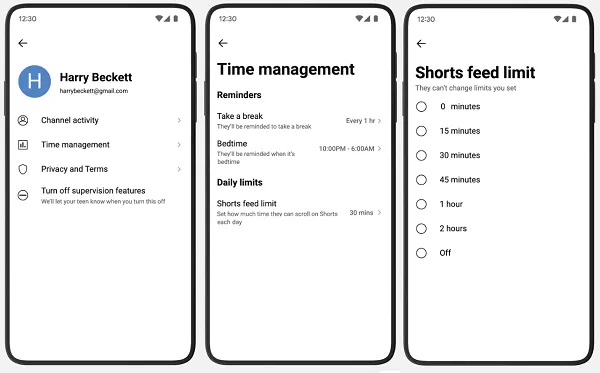
YouTube said that this will enable parents to ensure their kids are not wasting time scrolling through Shorts when they should be, say, focused on homework. The zero setting means that they cannot use the Shorts feed at all.
Though this may not add anything new, considering that YouTube announced in January that parents could set the feed to zero minutes. That said, it looks like this is now getting a broader rollout.
YouTube is also looking to make it easier for parents to choose the right age-appropriate account settings in the app. “In a few steps, parents can now create a supervised kid account directly on YouTube, and choose the content settings best fit for them,” the company said.
In combination, these features should give parents more capacity to manage and oversee their child’s activity in the app, and ensure that children are not being sucked into YouTube rabbit holes that consume their time and attention.
In addition to these functional updates, YouTube also provided tips for parents to help educate their kids on mindful internet usage.
Amid ongoing discussions about teen social media bans, YouTube has repeatedly noted that its approach is to protect teens in the digital world, not from it. Along those lines, YouTube’s Director of Global Health Dr. Garth Graham shared these tips:
- Talk openly - Make it a regular habit to chat about online experiences and the types of creators, and shows, your teen likes watching.
- Watch together - The best way to know what your teen is seeing? Watch it with them. Grab a spot on the sofa and be curious — ask them why they enjoy a particular creator.
- Agree on rules and use the tools - Talk about the boundaries that are right for your family. Use YouTube’s parental controls — like the Shorts feed limit, bedtime, and “take a break” reminders — to help build those habits.
- It’s a balancing act - Help your teens create a healthy balance between their online world and physical activities, hobbies, and face-to-face time.
- Promote mindful use - Teach them to be intentional. Guide them toward high-quality, enriching content that deepens their interests and broadens their perspectives.
These notes, along with enhanced controls to help manage teens’ time in the app, aim to provide more guidance on how parents can combat the negatives of web usage, as opposed to cutting children off from it.